


Reverse Phone Lookup — rLookup
4.01.76K Reviews
App Specs
- Version
- 1.3.6
- Updated On
- License
- Free
- Downloads
- 100,000+
- Developer
- Wios
- Categories
- Communication
- Platform
- Android
Screenshots
 Analysis by AppCompare
An unknown number is a small interruption that can turn into a surprisingly distracting puzzle. I like having a way to investigate a call before deciding whether to answer or call back, and that is the job Reverse Phone Lookup — rLookup sets out to do. It is a communication app from Wios, aimed at identifying incoming callers and helping people deal with spam. My view is that it is most useful as a quick first check, not as a guarantee that every caller can be identified.
Choose it for quick checks, not certainty
The key question is what you want from a caller lookup. If you mainly need to check an unfamiliar number and make a more informed choice about returning a call, rLookup has a clear purpose. If you want a complete record of every caller, or expect a name and detailed profile for every number, I would set expectations lower. Lookup results can be incomplete, so a blank or thin result should not be treated as proof that a call is safe or suspicious.
That distinction matters in ordinary situations. A missed call might be from a delivery driver, a clinic, a business, an old acquaintance, or a marketing caller. A lookup can give you another clue, but it cannot make the decision for you. I would use the result alongside the call context: whether you were expecting contact, whether the caller left a message, and whether the number appears in a conversation or appointment you already know about.
Where a lookup earns its place
rLookup is designed around a simple action: enter a number and inspect the result. That makes it a reasonable fit for people who do not want to maintain a complicated call-management setup just to investigate occasional unknown calls. The app has a 4.1 average from around 3.8 thousand ratings, and it has passed 100 thousand installs, suggesting that this focused use case has found an audience. It is free to install, though in-app purchases are available at $3.99 per item.
A useful habit is to search a number before saving it as a contact. If the result is uncertain, keep the number unsaved until you have a stronger reason to trust it. This avoids turning a one-off caller into a permanent entry that later looks familiar simply because it is in your address book. For a number that calls repeatedly, a lookup can also help you decide whether to return the call, ignore it, or use your phone’s blocking controls.
How it compares with the usual options
The built-in caller tools on a phone are often the simplest alternative: they are already there, and they can be enough when a number is recognized or a call is clearly unwanted. rLookup is more appealing when you want to actively investigate a number rather than rely only on what your phone shows. At the other end, dedicated call-screening services may suit someone seeking a broader, more automated approach. I would not choose rLookup on the assumption that it replaces every such tool; its strongest role is a convenient lookup for a specific number.
There is also a practical middle ground: search the number manually through a general web search or a business directory. That can help when you suspect the call came from an organization, but it takes more effort and can return unrelated matches. A purpose-built lookup keeps the task focused. Even so, I would compare clues rather than accept a single result as certain, especially if the number has little context or the information does not match why you were called.
Worth Reading Before You Choose

EA SPORTS FC Mobile 26 Is a Bigger Football Game, but It Takes Time

Flipboard Shows What News Apps Must Do Beyond the Feed

Switching to Android Auto Means Rethinking Your Driving Routine

Google Calendar Makes a Crowded Week Easier to Manage

Ludo King Makes the Most of the Minutes Between Plans

Baby Panda World Brings Quick Play to Modern Phones, but Its Game Library Feels Busy
Everyday use without overreacting
Imagine receiving a missed call while you are busy and not recognizing the number. Rather than calling back immediately, you can check it when you have a moment, then decide whether the result makes sense. If it looks like a possible business contact but gives you little confidence, waiting for a voicemail or a second attempt is a sensible next step. If it seems like spam, you can avoid engaging and consider blocking it through the phone’s own controls. The lookup is a decision aid, not a reason to call an unfamiliar number automatically.
I would also avoid treating location clues as a precise identity check. A broad indication about where a call may originate can be useful context, but it is not the same as knowing the caller’s current whereabouts or proving who owns the number. For sensitive matters, use an official number you obtain independently rather than relying on an incoming call or a lookup result. That is especially important if someone claims to represent a bank, government office, or other organization and asks you to share private information.
What to expect from the app
The app is free, with optional in-app purchases priced at $3.99 per item. That makes it easy to try the basic approach before spending anything, but I would first decide how often I actually need lookups and whether the free experience covers that routine. Occasional users may have little reason to pay; frequent users should review what a purchase offers in the app before deciding whether it is worthwhile. The age rating is Everyone, and the current version is 1.3.5, with Android 6.0 listed as the minimum operating-system requirement.
One point worth keeping in mind is that caller identification and spam handling depend on the usefulness of the information available for a particular number. A result may be clear, partial, or absent. I would not use the app as the sole basis for blocking a number that could be important, and I would not assume that no warning means a caller is trustworthy. If a call matters, look for independent confirmation; if it is clearly unwanted, the phone’s standard blocking feature may be the more direct option.
Who should look elsewhere
This app is a better fit for people who want occasional number checks than for anyone expecting a comprehensive personal safety system. If your main concern is stopping interruptions automatically, start with the call controls already available on your device and consider whether a broader screening service better matches your needs. If you rarely receive unknown calls, installing a separate lookup app may add little to your routine. And if you need verified contact details for a professional or urgent decision, use an official directory or contact channel instead of treating a lookup as authoritative.
There is a small but important trade-off in convenience: making a lookup is easy, but interpreting it still takes judgment. A familiar-looking name can be outdated or misleading, while a result with little detail may simply reflect limited information. I find the best workflow is to search, check whether the result fits the reason for the call, and then choose a cautious next step. That keeps the app useful without letting a label make the decision for me.
Getting Started with rLookup
First things first, downloading Reverse Phone Lookup — rLookup was a breeze. It’s available for both Android and iOS, so no worries about compatibility. After a quick installation, I was greeted with a neat and easy-to-navigate interface. It’s not cluttered, which is a big plus for someone like me who appreciates simplicity.
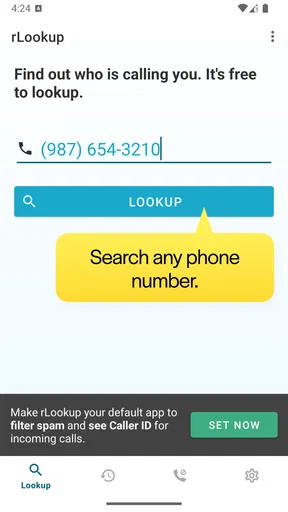
The app opens up to a straightforward search bar. You just pop in the number that’s been bugging you, hit search, and voila! The app gets to work. But, more on that in a bit.
Features That Stand Out
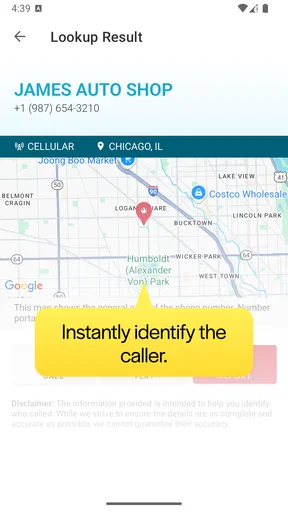
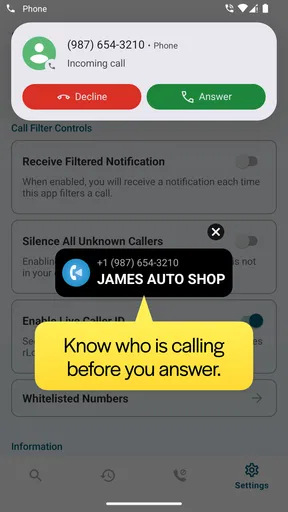
What really caught my attention was the range of features packed into this little app. Not only does it help you identify unknown callers, but it also provides additional details like location and even the type of phone. Here’s a quick rundown of what you get:
- Caller Identification: Quickly find out who’s behind that mysterious number.
- Location Tracking: Get a rough idea of where the call originated from.
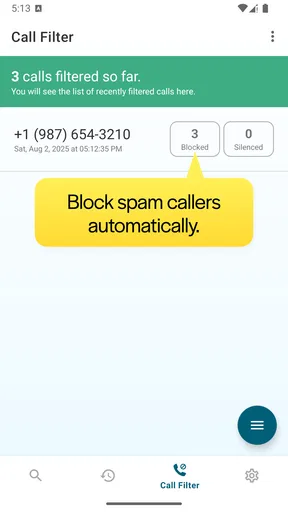
- Spam Detection: It flags potential spam numbers, which is super handy for avoiding those pesky telemarketers.
- Contact List Integration: Seamlessly integrates with your contacts to provide more information.
One feature I found particularly useful is the ability to save search results. This means you can easily access them later without having to run another search. Handy, right?
Putting It to the Test
Curious to see how well it worked, I decided to test it with a couple of unknown numbers. The search was remarkably fast. Within seconds, I had the name, location, and even some additional details about the caller. It was surprisingly accurate too, which was a relief.
One number turned out to be an old friend whose contact I’d lost, and another was, as expected, a pesky telemarketer. I was impressed by how much time and hassle this saved me.
User Experience and Design
Let’s talk about the design a bit more. The app’s layout is user-friendly, with a minimalistic design that makes navigation a breeze. I didn’t have to deal with any confusing menus or unnecessary buttons. Everything is laid out intuitively, which is great for those who aren’t tech-savvy.
Another thing I appreciated was the lack of intrusive ads. Sure, there are some, but they’re not overwhelming or disruptive, which is often a dealbreaker for me when using free apps.
A Few Considerations
While rLookup is pretty solid, it’s worth mentioning that like any app, it’s not perfect. Occasionally, I encountered numbers that didn’t return a result, or the information was sparse. This isn’t uncommon with phone lookup services, as they rely on publicly available data.
Additionally, the app offers in-app purchases for premium features, which might be a bit limiting if you’re sticking to the free version. But honestly, the free features are quite sufficient for most users.
Final Thoughts
All in all, Reverse Phone Lookup — rLookup is a handy tool that does exactly what it promises. It’s easy to use, effective, and can save you from those annoying spam calls. Whether you’re trying to reconnect with an old friend or just want to know who’s calling, it’s worth having in your app arsenal.
If you’re tired of unknown numbers and want to take back control of your call log, give rLookup a try. You might just find it’s the app you didn’t know you needed.
Making the result useful
For a number you have searched once, the saved result can be more useful as a reminder than as a verdict. I would note why I checked it, then revisit that context if the same number appears again. This is a practical way to avoid repeating a search while also keeping the result in perspective: a saved entry tells me what I saw previously, not whether the caller’s situation has changed.
If you are sorting through several missed calls, handle them one at a time rather than assuming that similar-looking numbers have the same owner. Search results are tied to the number entered, and a small typo can send you down the wrong path. Copying the number from the call record where possible, then checking the digits before searching, is a simple safeguard that prevents a misleading lookup.
A measured recommendation
Wios has kept rLookup focused on the question many people ask when an unfamiliar call arrives: is this number worth investigating? Its communication purpose is clear, and the app’s rating and install history show that it is used by a substantial group of people. Those figures are useful context, but they do not guarantee that a particular search will return a complete or correct answer, so I would judge it by whether the basic lookup workflow suits my own call habits.
My recommendation is straightforward: try it if you regularly receive unknown calls and want a simple extra check before responding. Keep your expectations realistic, use the result as one clue, and rely on official contact details for anything sensitive. If you want automatic call screening or almost never need to identify callers, your phone’s built-in options—or a different kind of service—may be a better match. For a person who wants occasional, hands-on checks without a complicated setup, rLookup is a practical tool to keep within reach.
Pros
- User-friendly interface
- easy navigation.
- Provides detailed caller information.
- Supports both landline and mobile numbers.
- Quick search results
- minimal wait time.
- No ads in the premium version.
Cons
- Limited free searches per day.
- Some numbers may not be listed.
- Premium version can be pricey.
- Requires internet connection.
- Occasional incorrect information.
FAQs for Reverse Phone Lookup — rLookup
What is Reverse Phone Lookup — rLookup and how does it work?
Reverse Phone Lookup — rLookup is an app designed to help users identify unknown callers by providing detailed information about the phone number. When you enter a number into the app, it searches extensive databases to retrieve information like the caller’s name, location, and other public records. It’s a useful tool for avoiding spam calls and verifying the identity of callers.
Is Reverse Phone Lookup — rLookup free to use?
The app typically offers a free version with basic features, such as identifying the general location of a phone number. However, more detailed information often requires a subscription or in-app purchases. These premium features might include access to the caller’s full name, address, and additional background details. Check the app’s pricing structure for specific details.
Is my personal data safe when using Reverse Phone Lookup — rLookup?
Yes, rLookup prioritizes user privacy and data security. The app uses encryption to protect your search history and personal information. However, it’s always a good practice to review the app’s privacy policy and ensure you are comfortable with how your data is handled before downloading the app.
Can Reverse Phone Lookup — rLookup identify international numbers?
The app has capabilities to search a wide range of international numbers, but its effectiveness can vary depending on the country. While it covers many regions, some countries might have limited data availability due to local privacy laws or data restrictions. Always check the app’s coverage area to see if it meets your needs.
What are the limitations of using Reverse Phone Lookup — rLookup?
While rLookup is a powerful tool, it may not always provide complete or accurate information, especially if the number is private or unlisted. Additionally, some features may require a subscription, and the app’s effectiveness can be influenced by the scope of its database. Users should use the app as a supplementary tool rather than a definitive source.


